Kadinsky Bauhaus in CSS Grid

deadlift and squat movement prep using a stretch band.
Here is how you can use a stretch band to help prep for deadlifts and squats (yes, swings too). The band gives you resistance so you can feel yourself actively pushing your knees out to get your femurs out of the way—making space for a deeper hinge (and inviting your glutes to the party). You can also amp your proprioception by “feeding the defect”—the band will naturally pull your knees in. You need to fix it. Alternate legs for even more awareness. See how your lift’s setup feels after a few sets of these.
How to establish a daily writing practice
Tips for publishing something new every day, and approaching your progression as a writer with kindness rather than judgement.
10 color palettes you should use for your next projects

Here are some approaches that we think will work well in almost any project:

Relearn CSS layout
If you find yourself wrestling with CSS layout, it’s likely you’re making decisions for browsers they should be making themselves. Through a series of simple, composable layouts, Every Layout will teach you how to better harness the built-in algorithms that power browsers and CSS.
This Lower-Body Exercise Can Cut Your Injury Risk in Half

Incorporating three sets of six to eight reps once a week can help keep your hamstrings strong.
Begin in a kneeling position with both ankles secured—tucking your feet under a bar, for example, or having a running buddy hold them down—and then progressively lean forward as slowly as possible while keeping your back straight. When you can’t resist anymore, just fall forward, catching yourself with your hands against the floor. Check out the video below for how to do it properly.
The Abs Finisher That Will Crush Your Core in Under 5 Minutes

- Alternating Straight Leg Toe Touches
- Flutter Kicks With Knee Tucks
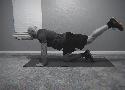
- Plank With Leg Lifts
- Side Plank Hip Dip With Leg Lift
- Leg Lifts With Pulses
- Straight Leg Sit-Ups
The Chief Habit: Your Ten-Minute Morning Fitness Plan
Becoming the person we want to be is typically a case of taking action—not once, but over and over again. This is hard to do, particularly within a world that ingeniously inserts technology meant to pull us from those actions that we decided we wanted to adopt. Logically, it makes perfect sense to add a workout five days per week, but life is busy and our emotions will often disagree with these plans.
7 Parts Of The Body That Need More Stretching
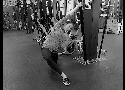
- Half Kneeling Lat Stretch
- Bottom of the Feet Massage
- Simple Wrist Stretches
- Frog Stretch
- Shoulder Extension Stretch
- Dowel Sit
- Low Back
How to Build Your Own Parallettes (And the Best Options Money Can Buy)
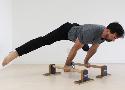
If you want to quickly improve your strength and coordination, almost nothing beats parallettes training. But not many people have a set of p-bars hanging around. In fact most people have never heard of them.

Why are you not designing your day-to-day experience?
Defining your personal KPIs
Design is all about making decisions that prioritize one metric over another.
What metrics are important to you?
- Less time spent
- Less forgetting:
- Less decision-making
- Less cognitive load
Losing Edges in Drawings
Implied lines are more closely related to the way our minds “see” objects. By understanding implied line and recognizing the approach that should be taken to create them, we can bypass our analytical left brain and create a drawing that is more accurate to what is observed.
Draw the entire scene within a defined picture plane on drawing paper or in your sketchbook, but do not use line. Instead, draw using only value. Allow the contrast that happens between the value, color, or texture create the “lines” in the drawing.
The Only 3 Types of Writing People Actually Want to Read - Medium
You can be authentic, unique, and sincere, but your writing has to do one of these three things to succeed.
Entertain
Educate
Inspire
Great writing is alchemy — you take bits of entertainment, mix in some education, and add a dash of inspiration, in order to create remarkable work.
Perception Is Reality – The Blog Of Darius Foroux – Medium
Do you ever feel misunderstood by others? Maybe you feel that people at work don’t get you. Or that your friends are not on the same page.
Maybe others truly don’t get you. But that’s not because of them, it’s most likely because of your own behavior. I’ll tell you why.
People can only judge their perception of you. And often, there’s a difference between perception and reality, right?
Persuasion and influence revolve around two related questions:
- How does our behavior influence the behavior of others?
- How does other people’s behavior influence our behavior?
Look inwardly. Change your behavior for the better. And always be mindful of how others perceive you. Especially, if you want something from them.
Misunderstandings and conflict are the results of the gap between your perception and how others perceive you. To resolve this, you have to understand why the gap is there in the first place, and then work on closing it.
Origami Lily Folding Instructions - How to make Origami Lily - Origami Flowers Folding Instructions
The Front-End Checklist
An Exhaustive List of all the Elements you need to have/test Before Launching your Website To Production.
Menschkeit The Definition and Philosophy of the Space Between a Handshake
The Definition of a Mensch:
A person having admirable, noble, or dignified characteristics, such as fortitude, responsibility, and firmness of purpose: "He radiates the kind of fundamental decency that has a name in Yiddish; he's a Mensch." (James Atlas).
A person who is admired, respected, and trusted because of a sense of ethics, fairness, and nobility.