Flickr: BHL’s Unexpected Success Story – Biodiversity Heritage Library


In July, 2011, several members of the BHL staff began putting illustrations from BHL books on Flickr. It started as a simple way to flag favorite staff images and document the illustrations we were…
42 InDesign tutorials to boost your skills | Creative Bloq
These InDesign tutorials will boost your knowledge of Adobe's software.
Commenting code - VimTricks
Comment or uncomment code in Vim with or without a plugin.
:norm i#
Are continuous glucose monitors a waste of time for people without diabetes? - Peter Attia

Some experts suggest CGMs are useless for nondiabetics. I disagree.
I like to see my patients with a mean glucose below 100 mg/dL, a glucose variability below 15 mg/dL, and, as noted above, no excursions of glucose above 140 mg/dL. After about a four-week intervention that included exercise changes and nutritional modifications his average glucose fell to 84 mg/dL, his glucose variability to 13 mg/dL, and he had zero events exceeding 140 mg/dL. If he can maintain this way of living in the long-run, it’s likely to translate into an improvement in healthspan and reduce his risk of glucose impairment.
I am a paid advisor to Dexcom; a company that develops, manufactures, and distributes CGMs.
Museo
A visual search engine for discovering free images from some of the best museums in the world.
Museo is a visual search engine that connects you with the Art Institute of Chicago, the Rijksmuseum, the Harvard Art Museums, the Minneapolis Institute of Art, the The Cleveland Museum of Art, and the New York Public Library Digital Collectionmore to come! Images you find here are typically free to use, but please check with the source institution for more specifics.
Why didn't I know this Cabbage Recipe before? better than meat ! I have never eaten so delicious !

- I keep forgetting to cook onion separately!!
- Microwaved cabbage with a little water
Why didn't I know this Cabbage Recipe before? better than meat ! I have never eaten so delicious !
ingredients:
500 g of cabbage
2 onions
1 tbsp of butter or olive oil
1 tsp of grated garlic
1 tsp of salt
1/2 tsp of black pepper
2 eggs
1 tsp of thyme ( optional)
1/2 cup of all-purpose flour (70g)
4 tbsp of vegetable oil
enjoy your meal !
Notes (02/21/2022)
- Measured 1lb of cabbabe
- Food process everything will make it smoother
- Maybe try some cauliflower
- Some hot peppers would be good
- Whole wheat flour not so good (maybe 50/50?)
Implementing API Security with Auth0 | Design and Build Great Web APIs by Mike Amundsen | The Pragmatic Programmers
This fast-paced and comprehensive book covers all the critical aspects of programming web APIs with NodeJS including design, build, test, security, and deployment.
How to Make Box Joints with Only a Router | Woodworking Jig
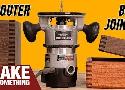
How to make finger and box joints with only a router. No table saw necessary! Brought to you by Squarespace. For 10% off your first purchase, go to: http://squarespace.com/makesomething
Hardwood from Kencraft:
https://goo.gl/pCyB95
How to make box joints (sometimes called finger joints) using only a router. Making box joints on the table saw requires a dado stack which isn’t available in all areas. The next best method is at the router table but not everyone has the space for a dedicated router table. This tutorial video shows a simple method on making a jig out of plywood for a hand held router that attaches to the base. Once you make this woodworking jig you’ll always be set up for box joints and finger joints. If you choose to change up your box joint finger width you’ll need to swap out the bit and make a dedicated fence for that bit.
iPhone Templates - Eric Kennedy
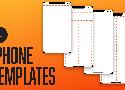
It’s got:
- Horizontal rulers at the top of the frame showing where (1) page actions, (2) page title, and (3) the search bar (if applicable) go
- Horizontal rulers at the bottom of the page showing where the tab bar goes
- Vertical rulers at (1) the standard iOS side margins and (2) the centerline
- A single-layer status bar – easy to delete or change to white, as needed
- A single layer device outline (including notch)
And it makes it dead simple to lay out apps in a “typical” iOS style.
How to Correct Your Posture | How Posture Affects Your Workouts
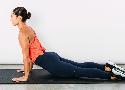
Sitting with bad posture all day may up your risk of injury.
- Hip Flexor Stretch
- Glute Bridge
- Upper Trapezius Stretch
- Updog (Lumbar Mobilization Stretch)
7 Parts of the Body That Need More Stretching - Breaking Muscle
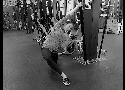
Here are seven stretches to do after lifting sessions for the areas of the body we often forget about.
1. Half Kneeling Lat Stretch
Position yourself close to a post and get into a lunge—or a half kneeling position. With your outside arm, reach over your head and grab the post. Place your inside hand below that. Then lean away from the post and into your outside lat.
Hold for 1 minute per side. I find this stretch particularly useful after a big pulling session.
2. Bottom of the Feet Massage
I like massaging them by rolling them out on a lacrosse ball.
3. Simple Wrist Stretches
Spend a good 30 seconds in each of these two positions and make sure you keep your elbows straight on both of these.
4. Frog Stretch
Though I often see people stretching their glutes, hamstrings, and quads, I rarely see people stretching their inner thighs and groin.
Hang out for at least a minute after a big squat day.
5. Shoulder Extension Stretch
I like this dowel shoulder extension stretch. The narrower your hands are on the dowel and the higher you can raise your hands, the deeper the stretch will be.
Spend 1 minute in this position.
6. Dowel Sit
Grab a dowel and place it behind your knees and then sit down on your shins. Every 20 seconds, roll the dowel one revolution until you’re eventually down at your Achilles.
Spend a solid 2 to 3 minutes working your way down your calves. If you do a lot of running or jumping, this one is particularly useful for your calves.
7. Low Back
This is just a dead-hang hold from a bar.
Spend 1 minute or so in this position. This is particularly useful after a big hamstring and glute lifting session.
The Rabbit Hole

Below is the visual library for all the books I have summarized
Getting Deep Into Shadows | CSS-Tricks - CSS-Tricks
Let’s talk shadows in web design. Shadows add texture, perspective, and emphasize the dimensions of objects.
There are two kinds of shadows that occur when a light shines on an object, a drop shadow and a form shadow.
Help for Tight Hips - Breaking Muscle
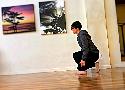
Strengthen Your Hip Flexors
- Sit to Tuck
- Hip Flexor Strengthening
- Hip Flex to Squat
- Hip shrimp
- Squat Walk
Below are four awareness exercises to improve mobility through the pelvis.
A Systematic Approach to Mobility - Breaking Muscle
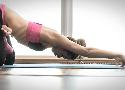
So you want to get mobile. You have dreams of dropping into a deep squat with ease, of being the person that can fold forward into a pancake position. Or maybe your goals are a little less lofty. Maybe you just want to be able to bend down and not feel like things are going.
Mobility Workout | Yoga-Inspired Mobility Workout for Runners
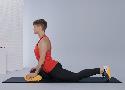
This workout helps runners gain a greater range of motion, increase their mobility, and increase their flexibility.
The Fighter Pullup Program Revisited | StrongFirst
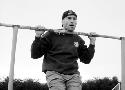
Here is a powerful Russian pullup program adaptable to any level of ability. The fighter pullup program can double or triple your pullups in one month.
The 5RM Fighter Pullup Program
Day 1 5, 4, 3, 2, 1
Day 2 5, 4, 3, 2, 2
Day 3 5, 4, 3, 3, 2
Day 4 5, 4, 4, 3, 2
Day 5 5, 5, 4, 3, 2
Day 6 Off
Day 7 6, 5, 4, 3, 2
Day 8 6, 5, 4, 3, 3
Day 9 6, 5, 4, 4, 3
Day 10 6, 5, 5, 4, 3
Day 11 6, 6, 5, 4, 3
Day 12 Off
Day 13 7, 6, 5, 4, 3
Day 14 7, 6, 5, 4, 4
Day 15 7, 6, 5, 5, 4
Day 16 7, 6, 6, 5, 4
Day 17 7, 7, 6, 5, 4
Day 18 Off
Day 19 8, 7, 6, 5, 4
Day 20 8, 7, 6, 5, 5
Day 21 8, 7, 6, 6, 5
Day 22 8, 7, 7, 6, 5
Day 23 8, 8, 7, 6, 5
Day 24 Off
Day 25 9, 8, 7, 6, 5
Day 26 9, 8, 7, 6, 6
Day 27 9, 8, 7, 7, 6
Day 28 9, 8, 8, 7, 6
Day 29 9, 9, 8, 7, 6
Day 30 Off
Tutorials—Eleventy, a simpler static site generator.
Tutorials—Eleventy, a simpler static site generator.
3 Core Stability Exercises For a Better Squat – Squat University
Proper mechanics during the squat is all about maintaining proper core stability. If core stability is compromised strength and power is lost.
https://squatuniversity.com/2018/06/21/the-mcgill-big-3-for-core-stability/
Level 2 Corrective (Bird Dog)

Stage 3 Corrective (Zombie Squat)

Recommended sets/reps: 2-3 sets of 5 repetitions
Side Planks
Goblet Squat Hold
Form design: from zero to hero all in one blog post – Adam Silver – Designer, London, UK.

90 percent of the problems found in forms solved in a few hundred precious words.
-
Use sentence case for labels, hints and error messages. It’s easier to read and spot nouns. Use a verb for button text because the user is doing something.
-
Be tolerant of mistakes like extra spaces, dashes and slashes. Do the hard work so users don’t have to.
-
Prefix the word “Error:” to the document’s title. It’s the first thing announced by screen readers when the page loads.
-
Tell users what they need and how long the form will take to complete before they start.